![FlyFreely_Logo_White_OnDark.png]](https://knowledge.flyfreely.io/hs-fs/hubfs/FlyFreely_Logo_White_OnDark.png?height=40&name=FlyFreely_Logo_White_OnDark.png)
You can now set your organisations unit preferences for date /time settings from the Office App.
We are currently working on adding more unit preference changes. Please keep an eye out in the Release Notes for updates. We will also ensure this article is kept current.
Date / Time Settings
Manage your date and time settings from the organisation admin panel.
Setting is applied at the organisation level:
This change applies to the whole organisation. This is not user specific.
Click on the cog icon to access the organisation admin panel

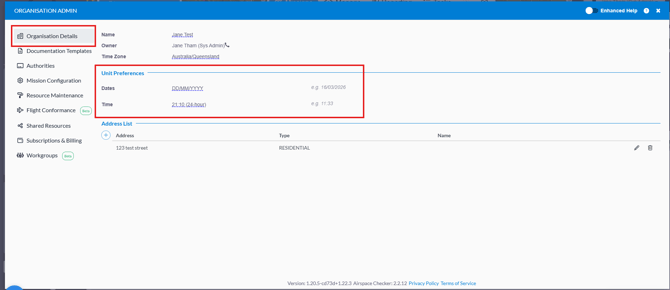
Within the Organisation Details tab, you will find a section labelled 'Unit Preferences.' Here, you can easily adjust your date and time settings according to your preferences.
Time Format:
The time format settings aren't applied in some areas where time input is available. This should be indicated by the lack of am/pm labels if your preference is 12-hour time. In some important cases there's additional labelling as well.