![FlyFreely_Logo_White_OnDark.png]](https://knowledge.flyfreely.io/hs-fs/hubfs/FlyFreely_Logo_White_OnDark.png?height=40&name=FlyFreely_Logo_White_OnDark.png)
What's required for this feature to work:
Office App: Add all pilots to the pre-planned mission and ensure their roles and nominations are correctly defined in the mission plan. This ensures individual flights can be assigned to the correct pilot in the field app and that flight records are logged accurately for compliance.
Field App: Correct user accounts are logged into on the relevant devices
Key Restriction
Regardless of the approach, only one user/device can have the mission active at any given time. This is by design to prevent duplicate data uploads and sync errors.
Device-to-Device Takeover (Same Account)
If you want to hand over a mission from one device to another, the Remote Pilot in Command (RPIC) must be logged in under the same account on both devices. The mission's RPIC can be logged into multiple devices and will have the option to "take over" from one device to another during the operation.
To avoid sync errors, ensure the mission is synced in the correct sequence and is active on only one device at any given time.
Correct sequence: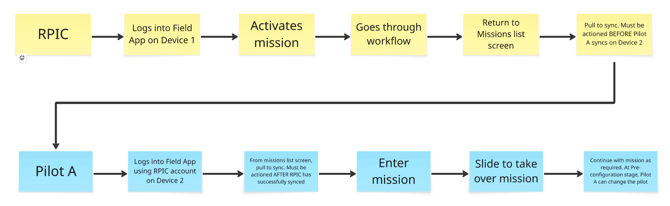
Typical use cases include:
-
FlyFreely is running on a smart controller to log flights but needs to be temporarily used on a separate device to run through checklists.
- More than 1 RPA used on a mission
- Pilots taking turns at flying eg training purposes
Handing Over to a Different Pilot (Different Account)
If you want a another person (using their own account) who is not the RPIC to manage the mission in the field app, you can nominate them as a Field App Operator.
The Field App Operator is nominated on the mission plan via the Office App. This allows the nominated user to access and activate the mission in the Field App using their own account, even if they are not the RPIC.
Typical use cases include:
- The RPIC focuses on operating the aircraft while the nominated field app operator completes all required operational forms, such as Job Safety Analysis (JSA), pre-flight, and post-flight checklists.