![FlyFreely_Logo_White_OnDark.png]](https://knowledge.flyfreely.io/hs-fs/hubfs/FlyFreely_Logo_White_OnDark.png?height=40&name=FlyFreely_Logo_White_OnDark.png)
Overview
You can assign mission approvers other than the Chief Remote Pilot listed in your operations manual. Approvers are nominated through your Company Authorities, and available roles vary by authority.
Important: Any nominated role (such as a Senior Remote Pilot) must be explicitly defined in your company’s operations manual.
Nominated users can only approve missions under their assigned authority.
Prerequisites
- Access to the Organisation Admin Panel.
How to Nominate an Approver
- Open the Organisation Admin Panel.

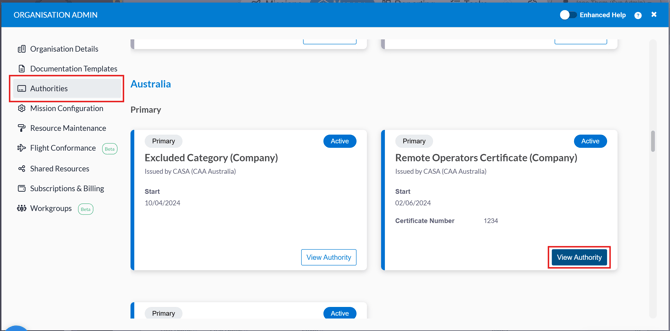
- Click Authorities.
- Choose the relevant authority (e.g., Remote Operators Certificate).
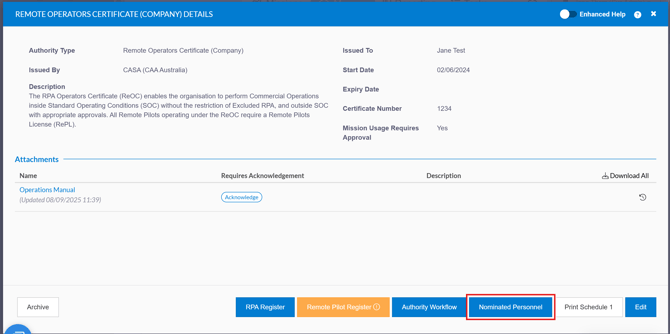
- Click 'Nominated Personnel'
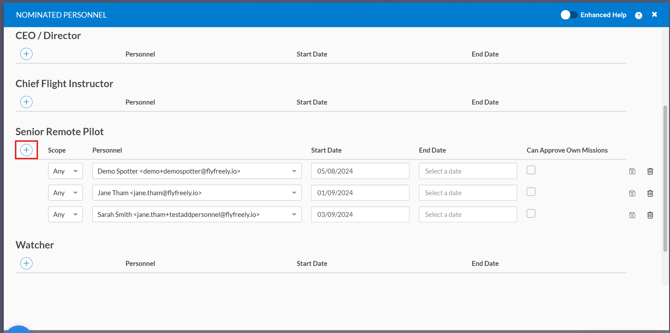
- Assign the desired role to the user and save your changes.
NOTE:
-
Available roles vary by authority
-
Nominated users can only approve missions under their assigned authority.