![FlyFreely_Logo_White_OnDark.png]](https://knowledge.flyfreely.io/hs-fs/hubfs/FlyFreely_Logo_White_OnDark.png?height=40&name=FlyFreely_Logo_White_OnDark.png)
Context: Shared Resources
To understand custodianship, it helps to understand the broader shared resources framework. In FlyFreely, enterprise customers can operate across multiple organisations in a parent/child structure. The parent organisation can share resources with child organisations
What is a Resource Custodian?
A Resource Custodian is a designation applied to a child organisation to indicate that they are the responsible party for a shared resource. This allows organisations to:
-
Assign custodianship of a shared resource to a specific child org
-
Track which child org currently holds custodianship
-
Remove the custodian designation when needed
How to Manage Custodianship
The custodian designation is managed from the Shared Resources page in the Organisation Admin panel:
-
Navigate to Organisation Admin → Shared Resources
-
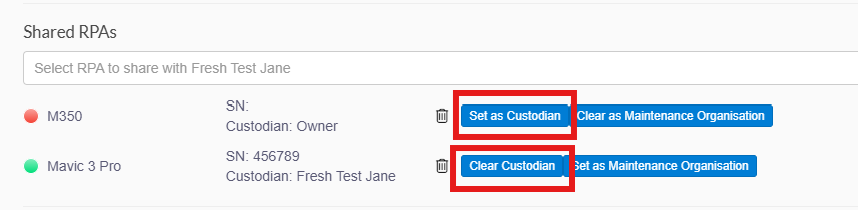
To assign a child org as custodian → click the "Set as Custodian" button next to the relevant resource
-
To remove the custodian designation → click the "Clear Custodian" button
Important Notes
-
Maintenance functions for shared resources (RPAs, equipment, battery sets) remain controlled by the parent organisation unless the 'Maintenance Organisation' is set.
-
To access and manage shared resources at all, a user must have the 'Organisation Admin' role for the relevant organisations.
-
The shared resources feature is available on Enterprise plans only.