![FlyFreely_Logo_White_OnDark.png]](https://knowledge.flyfreely.io/hs-fs/hubfs/FlyFreely_Logo_White_OnDark.png?height=40&name=FlyFreely_Logo_White_OnDark.png)
By default, the Remote Pilot in Command (RPIC) on the mission plan has access to the mission on the field app.
We've introduced the option to select other users on the mission plan as the 'Field App Operator'. This allows more flexibility when there are multiple crew members participating in an operation.
By nominating another user on the mission plan as the Field App Operator, this allows the nominated user access to the mission in the field app instead of the RPIC.
The restriction still remains - Only one user can access the mission on the field app to activate the mission. This is to prevent issues with activating the same mission by different users and syncing errors.
How to assign the Field App Operator
This is actioned at the 'View Mission Plan' window. Once a mission is created, click on the mission to view the mission plan.
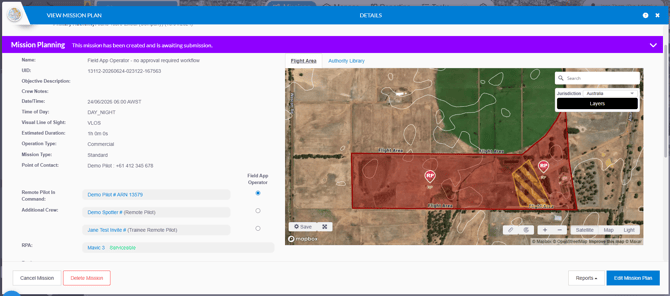
Select the Field App Operator - this will dictate which user has access to activate the mission in the field app. (i.e. this user must login to their account on the field app to access the mission).
By default, if no other user is nominated, the Field App Operator is the Remote Pilot in Command specified on the mission plan.
When this may be useful
Nominating a field app operator allows another pilot or crew member—who is not the Remote Pilot in Command (RPIC)—to access the mission and manage the operation via the field app.
This is particularly useful when the RPIC must focus entirely on flying the drone and cannot be distracted by "paperwork". While the RPIC operates the aircraft, the nominated field app operator can seamlessly complete all required operational forms, such as Job Safety Analysis (JSA), pre-flight, and post-flight checklists.